How to Choose the Best SIP Video Door Phone?
A visitor presses the call button. Your phone rings, but the image arrives late and the voice sounds thin. That brief exchange shows why choosing a Sip Video Door Phone involves more than comparing screen sizes. Network compatibility, clear two-way audio, reliable night images, and simple visitor controls matter at the front door. So does a device’s performance when the Wi-Fi signal weakens.
Industry data offers useful context, not a shortcut to a buying decision. Grand View Research estimated the global smart home market at USD 127.8 billion in 2024, reflecting growing interest in connected home products. But that broad estimate cannot tell you whether a specific door phone will work smoothly with your router, indoor monitor, or existing SIP system. SIP co-author Jonathan Rosenberg and colleagues describe the protocol in RFC 3261 as “an application-layer control (signaling) protocol for creating, modifying, and terminating sessions.” The standard explains the communications foundation; it does not certify every product’s quality.
Small details count. Check supported SIP standards, power options, camera angle, weather protection, and how calls transfer to a mobile app. Ask whether the manufacturer provides firmware updates and clear setup instructions. If possible, test the unit at the actual entrance, where glare, distance, and weak coverage can change the experience. No model is perfect. Product specifications can look reassuring, yet installation and network conditions still shape everyday performance. This guide compares the practical features and trade-offs that help buyers choose with confidence.
What Is a SIP Video Door Phone and How Does It Work?
A SIP video door phone uses Session Initiation Protocol (SIP) to start, manage, and end calls over an IP network. When a visitor presses the panel, it sends a call request to an indoor monitor, mobile app, or building reception system. Once answered, audio and video usually travel as separate media streams, commonly using RTP. SIP handles the conversation setup; it does not itself carry the video. That distinction matters.
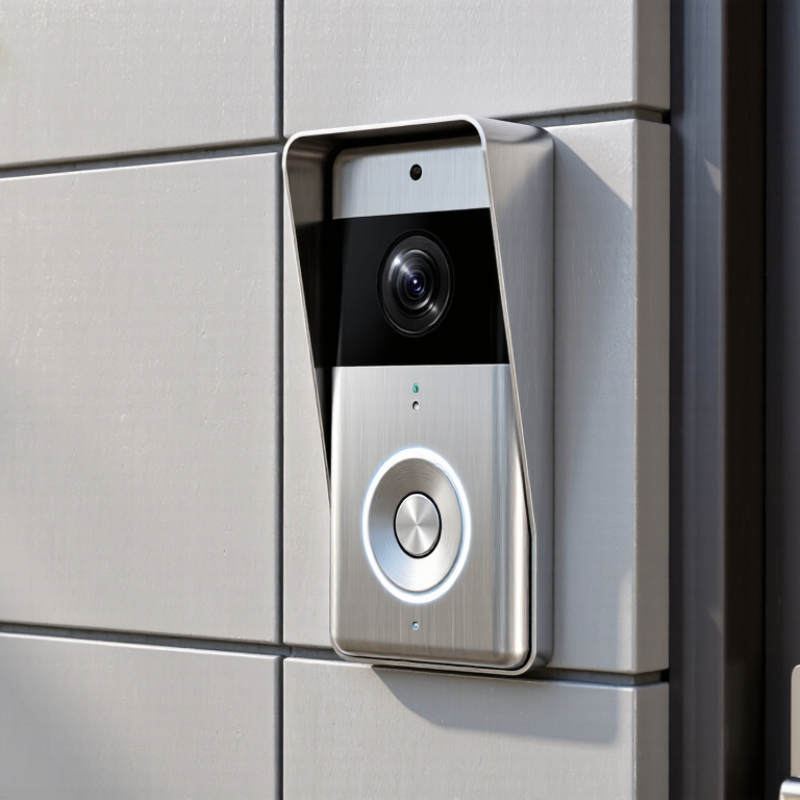
In practice, the outdoor unit combines a camera, microphone, speaker, and call button. A network connection, often Ethernet with Power over Ethernet, links it to the answering device. The resident can speak with the visitor and, if the system is connected to an access relay, release the entrance remotely. Still, “open” does not mean effortless: devices may differ in supported codecs, SIP settings, and video formats, so compatibility should be checked before installation.
The broader market shows why IP video systems are receiving attention, though it does not prove demand for SIP door phones specifically. MarketsandMarkets’ Video Surveillance Market report projected growth from USD 74.6 billion in 2024 to USD 112.4 billion by 2029. For a real installation, network quality matters as much as the specification sheet. A weak Wi-Fi signal can leave a clear image but delayed speech—or a missed call.
Which Site and Communication Requirements Should You Identify?
Start with the entrance, not the product sheet. Note whether visitors stand under a canopy or in wind-driven rain. Check the camera’s view at eye level, the distance to the gate, and whether backlighting hides faces at sunset. Listen for traffic, fans, and echo; a clear image is only half the conversation. Record the available cable route, power source, and network signal at the mounting point. Small obstacles matter. A metal door or thick stone wall can weaken wireless connections, while long cable runs may affect power delivery. I would not assume the existing network is ready just because office computers work well.
Then define how calls should travel. Identify who answers, how calls transfer, and what happens when the first recipient is unavailable. Confirm required SIP compatibility, audio codecs, video quality, and whether the system must connect with a PBX or access-control platform. Ask the IT team about network segmentation, remote access, and software updates. Verizon’s 2024 Data Breach Investigations Report found that exploitation of vulnerabilities increased 180% as an initial access route in observed breaches. That finding is not specific to door phones, but it makes update and access controls worth checking. Write down expected call volume and peak entry times, too. These details are easy to overlook, and estimates may need revision after a busy-day test.
| Requirement | What to Identify at the Site | Practical Selection Guidance | How to Verify |
|---|---|---|---|
| Entry location and exposure | Indoor or outdoor installation, exposure to rain and dust, direct sunlight, temperature range, and risk of impact or tampering. | Choose an enclosure rating suitable for the actual exposure. Check the manufacturer’s stated operating-temperature range and, where needed, ingress-protection and impact-protection ratings. | Compare the installation conditions with the product specifications. Confirm that seals, mounting accessories, and any required weather protection are included. |
| Mounting and viewing angle | Mounting height, wall or pedestal construction, approach direction, visitor distance, and whether the camera faces strong backlighting. | Check the camera’s field of view, image performance in the expected lighting, and available surface or flush-mount options. Avoid placing the camera where visitors are routinely out of frame. | Mark the proposed camera position and test the view at typical visitor locations and times of day. |
| Network connection | Availability of Ethernet at the entrance, cable route and length, network-segment assignment, and whether the door station is on a secure LAN or a routed network. | Confirm the device’s Ethernet speed, addressing options, VLAN support, and network requirements. Use a properly installed Ethernet run; copper Ethernet channels are generally limited to 100 metres. | Check the cable route, switch-port configuration, IP addressing plan, and connectivity to the SIP server and other required services. |
| Power at the entrance | Whether power is available locally, whether the network switch supports Power over Ethernet (PoE), and the cable length and power budget. | Match the door phone’s specified power method and PoE standard to the available supply. Allow for the device’s maximum power draw and any connected accessories. | Review the device power specifications and switch PoE budget. Confirm that the selected port can supply the required power under load. |
| SIP platform compatibility | The SIP server or PBX in use, account-registration method, extension or directory plan, and any required call-routing rules. | Confirm SIP registration and call-control compatibility. Check supported codecs, DTMF methods, transport options, and any platform-specific provisioning requirements before purchase. | Test registration, calls to intended endpoints, answer and hang-up behavior, and recovery after a network or power interruption. |
| Video and audio quality | Expected visitor traffic, ambient noise, lighting conditions, viewing devices, and the quality of the available network connection. | Compare supported video and audio codecs with the receiving phones or software. Confirm that two-way audio, echo control, and the required video resolution are supported end to end. | Place test calls from the entrance and assess image clarity, lip synchronization, speech intelligibility, and performance in daytime and nighttime conditions. |
| Network capacity and call quality | Available bandwidth, concurrent calls, other traffic on the network, and whether voice or video traffic crosses a WAN connection. | Estimate bandwidth using the selected codecs, resolution, frame rate, and number of simultaneous calls. Where supported, configure suitable QoS policies for real-time traffic. | Review switch and router utilization, test during busy periods, and check for packet loss, jitter, and latency on the call path. |
| Firewall, NAT, and remote access | Whether calls remain on the local network or traverse firewalls, NAT devices, VPNs, or remote-access services. | Document the required SIP and media paths and configure only the necessary firewall rules. Use supported secure signaling and media-encryption options where required. | Validate inbound and outbound calls through the actual network path. Confirm that firewall timeouts and NAT behavior do not interrupt signaling or media. |
| Door release and access control | Lock type, required release method, fail-safe or fail-secure behavior, existing access-control equipment, and local safety requirements. | Check the door phone’s relay ratings and wiring diagrams. Use an appropriate external relay or access-control system when the lock’s electrical requirements exceed the device’s ratings. | Have a qualified installer verify the circuit, release duration, emergency egress behavior, and operation during power or network failure. |
| Users and call routing | Number of residents or staff, reception coverage, after-hours handling, call groups, and the need to answer from desk phones or mobile clients. | Choose a system that supports the required directory, call-forwarding, schedules, and multiple answering endpoints. Define who can release the door and under what conditions. | Test normal, unanswered, busy, and after-hours call paths with representative users and endpoints. |
| Security and administration | Account-management process, device-management access, credential policy, update responsibility, and applicable privacy or retention requirements. | Look for unique credentials, role-based administration, supported firmware updates, and encrypted communication options. Disable unused services and restrict management access to authorized networks. | Review security documentation and administrative settings. Confirm update procedures, access logs where available, and retention settings for any stored recordings or images. |
| Installation and ongoing support | Mounting surface, conduit and cable access, installer availability, expected service life, and replacement or maintenance procedures. | Consider installation accessories, configuration tools, spare-part availability, and whether the device can be maintained without disrupting other entry systems. | Inspect the installation plan, document network and SIP settings securely, and confirm the support and firmware-maintenance process before deployment. |
How Can You Check SIP Compatibility and Network Support?
Before choosing a SIP video door phone, confirm how it registers with your phone system or SIP server. Check the supported SIP version, authentication method, and whether it can use UDP, TCP, or TLS. Ask for a compatibility list and verify that the device supports the same video codec and resolution as your system. A shared codec matters. SIP support alone does not guarantee clear video or working two-way audio.
Network conditions matter just as much.
Check the phone’s Ethernet and Wi-Fi options, PoE requirements, and bandwidth needs for live video. On a busy network, a call may connect while the image freezes. Review firewall and NAT requirements, then ask your network administrator whether the needed traffic can pass reliably.
If the door phone and server sit on separate VLANs, confirm that routing and access rules allow registration and media traffic. Small details matter.
Test with the actual network and intended server before installation, if possible. A specification sheet can look complete, yet real performance may vary with router settings, cable quality, and network load. A short trial can reveal issues that paperwork misses.
Which Video, Audio, Access, and Security Features Matter Most?
A SIP video door phone should show more than a face. Look for clear video in both bright sunlight and a dim entryway. A wide viewing angle can reveal a visitor standing beside the camera, but too much distortion may make faces harder to recognize. Check whether the image stays smooth during a call. Audio matters just as much. Two-way sound should remain understandable near traffic or a humming ventilation fan. Echo cancellation and adjustable volume help, though no speaker can erase every noisy environment.
Access features should fit the way people actually enter your building. A keypad, credential reader, or remote release may be useful, but each adds setup and maintenance needs. Confirm that authorized staff can update access permissions and review entry records. For security, use encrypted communication, strong account controls, and supported software updates. Ask how the device behaves during a network or power outage; a polished demo rarely answers that. No single feature guarantees security.
Tips: Test the camera at the actual mounting height, then check faces from a few steps away. Try a call with the door closed and background noise present. Review storage, update, and backup options before purchase. If a feature sounds impressive but nobody will use it, reconsider it.
How Should You Compare Installation, Reliability, and Ongoing Costs?
A useful comparison starts with the installation, not the screen. Check whether the door phone supports standard SIP and works with your existing indoor stations or call server. If it uses Power over Ethernet, one cable can carry power and network traffic, but the switch must supply enough power. Ask for the full installed quote, including cabling, configuration, and any electrician’s work. Brick walls and long cable runs can change the price quickly.
Reliability depends on more than a weather rating. Check the stated operating temperature, ingress-protection rating, firmware-update policy, and what happens during an internet or power failure. Can residents still open the door locally? Is replacement hardware available? Verizon’s 2024 Data Breach Investigations Report found that the human element was involved in 68% of breaches across its dataset. That is not a door-phone failure rate, but it is a reason to ask about account controls and update support. For running costs, the U.S. Energy Information Administration reported an average residential electricity price of 16.48 cents per kilowatt-hour in 2024. A 5-watt device running all year would use about 44 kilowatt-hours, or roughly $7. That estimate excludes network equipment and service fees. Small details matter.
Tips: Request a written three-year cost estimate covering installation, electricity, cloud or call-service fees, and maintenance. Measure before buying. Then test the actual cable route and network signal; planning on paper can miss a stubborn dead spot.
